GMBS Playbook Chapter 11- Build Your Business Operating System
How to Connect Your Tools, Data, and Workflows So Your Business Can Run Without Constantly Running You
A small business can accumulate technology surprisingly quickly.
- You start with a website.
- Then you need email marketing.
- Someone recommends a CRM.
- You add accounting software.
- Then project management.
- Social media scheduling.
- Online payments.
- Cloud storage.
- AI tools.
- Maybe an automation platform
Before long, you have ten different tools helping you run your business—and somehow you are still copying information from one system to another.
The problem isn’t necessarily that you chose the wrong tools.
The problem may be that you have tools, but you don’t yet have a system.
That distinction becomes increasingly important as a business grows.
A collection of software helps you perform tasks.
A Business Operating System connects those tasks into repeatable workflows.
And that is what we are going to build.
What Is a Small Business Operating System?
We’re not talking about Windows or macOS.
Think of your Business Operating System as the infrastructure underneath your company.
It determines:
- where information enters the business;
- where customer information is stored;
- how leads become customers;
- how work gets assigned;
- how customers receive products or services;
- how invoices and payments are handled;
- how customers are followed up with;
- and how you know what is actually happening across the business.
A simple Business Operating System might look like this:
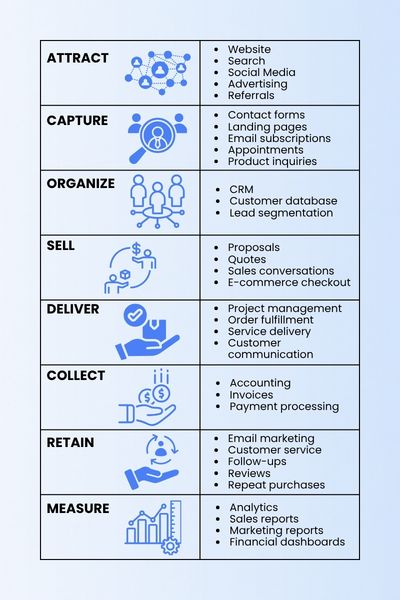
This is the operational backbone of the business.
The specific software can change.
The architecture should remain relatively stable.
Step 1: Start With the Customer Journey, Not the Software
One of the most common mistakes small businesses make is choosing software before designing the process.
Someone recommends a popular CRM, so you subscribe.
Then you discover your email platform doesn’t integrate properly with it.
Then your website form sends inquiries somewhere else.
Soon, customer information exists in four places.
Instead, begin with a much simpler question:
What happens from the moment someone discovers our business until they become a repeat customer?
Map that journey first.
For example:
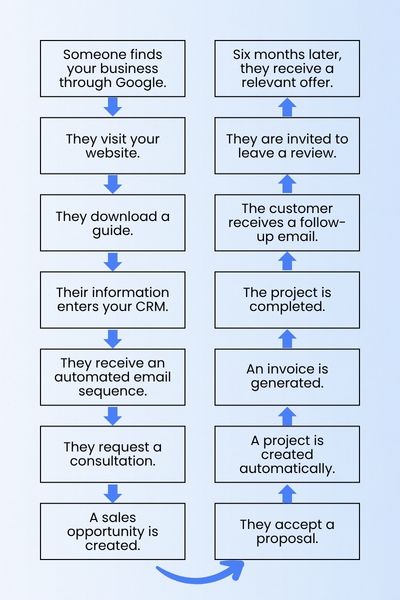
Now we have a workflow.
Only after that should we decide which tools belong at each stage.
Step 2: Create One Source of Truth for Customer Data
This may be the most important principle in your entire operating system.
Customer information needs a primary home.
For many businesses, that home should be the CRM.
Imagine a prospective customer named Sarah.
Sarah:
- downloaded an ebook;
- attended a webinar;
- requested a quote;
- purchased a service;
- opened three marketing emails;
- submitted a support request;
- and later referred another customer.
If each activity lives in a different disconnected system, your business sees fragments of Sarah.
A properly designed system sees one customer relationship.
Your CRM should ideally help you answer questions such as:
Who is this person?
Where did they come from?
What are they interested in?
Have we contacted them?
What have they purchased?
What is the next action?
How valuable is this relationship?
This becomes increasingly important as employees, contractors, salespeople, and marketing partners become involved.
Your database becomes organizational memory.
Step 3: Separate Prospects From Customers
One simple database decision can dramatically improve how a business communicates.
Don’t treat everyone in your database the same.
At minimum, separate contacts into categories such as:
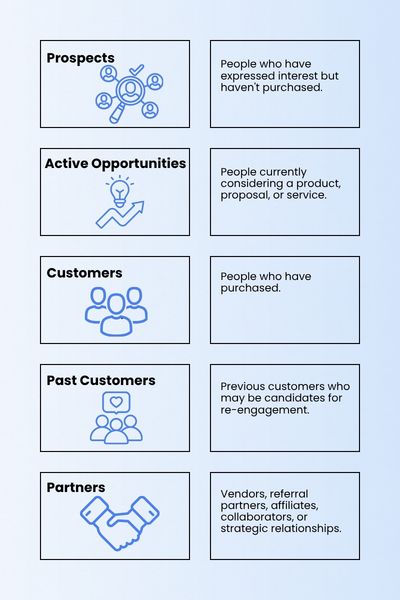
From there, segmentation can become more sophisticated.
You might categorize customers by:
- product;
- service;
- geography;
- industry;
- purchase history;
- lead source;
- lifetime value;
- engagement level.
Good segmentation makes automation much more useful because different people can receive different communications.
Step 4: Connect Sales to Delivery
Another common operational gap occurs immediately after the sale.
The sales team closes the customer.
Then someone sends an email.
Then someone creates a project.
Then someone tells accounting.
Then someone sends onboarding documents.
Every manual handoff creates another opportunity for something to be forgotten.
Instead, define a trigger.
For example:
Proposal accepted
could trigger:
→ Update CRM status to Customer
→ Create project
→ Assign project owner
→ Create customer folder
→ Send welcome email
→ Generate invoice
→ Create onboarding tasks
One event can initiate an entire operational sequence.
This is where automation starts becoming genuinely valuable.
Automation isn’t primarily about eliminating people.
It is about eliminating unnecessary handoffs, duplication, and memory-dependent tasks.
Step 5: Connect Your Financial System
Revenue shouldn’t exist separately from your customer system.
Your operating system should allow you to understand not only:
How much money did we make?
but also:
Where did the money come from?
Ideally, you should be able to connect revenue to:
- customers;
- products;
- services;
- campaigns;
- lead sources;
- salespeople;
- acquisition channels.
Suppose your business generated $100,000.
That number alone tells you very little.
But imagine knowing:
$32,000 came from organic search.
$24,000 came from referrals.
$18,000 came from email marketing.
$15,000 came from paid advertising.
$11,000 came from partnerships.
Now you can make better decisions about where to invest.
Step 6: Build a Management Dashboard
As your business grows, you shouldn’t need to open eight applications every morning just to understand what is happening.
Create a simple dashboard.
Start with a handful of meaningful metrics.
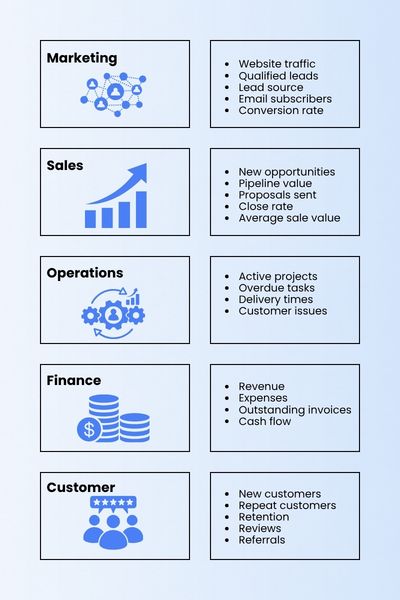
The objective isn’t to measure everything.
It is to identify the numbers that tell you whether your business system is healthy.
Step 7: Add Automation Carefully
Automation should come after the workflow is understood.
Automating a bad process simply makes the bad process happen faster.
Before automating anything, ask:
Is this task repetitive?
Does it happen frequently?
Does it follow predictable rules?
Does it require human judgment?
Tasks involving repetitive data movement are often excellent automation candidates.
For example:
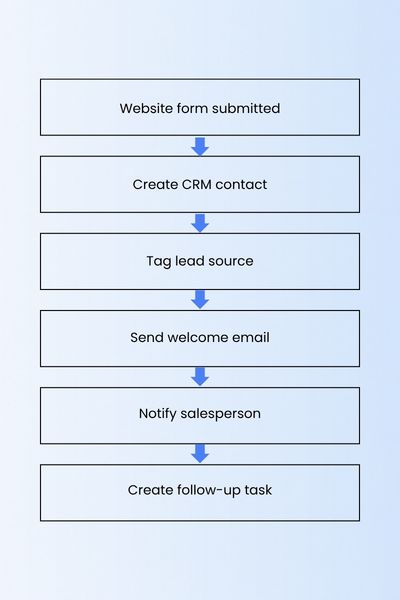
The human salesperson can then spend time having the conversation rather than copying contact information.
Step 8: Add AI Where It Actually Helps
AI should become another layer in the operating system—not another disconnected application.
Useful applications may include:
- drafting customer communications;
- summarizing sales conversations;
- categorizing support requests;
- researching prospects;
- generating proposal drafts;
- analyzing customer feedback;
- creating marketing variations;
- summarizing reports;
- identifying patterns in business data.
The question shouldn’t be:
Where can we use AI?
A better question is:
Where does our current workflow require unnecessary human effort, and can AI reduce that effort without reducing quality?
That keeps technology serving the business rather than the business reorganizing itself around technology.
The GMBS Business Operating System
You can think about the entire system in eight stages:
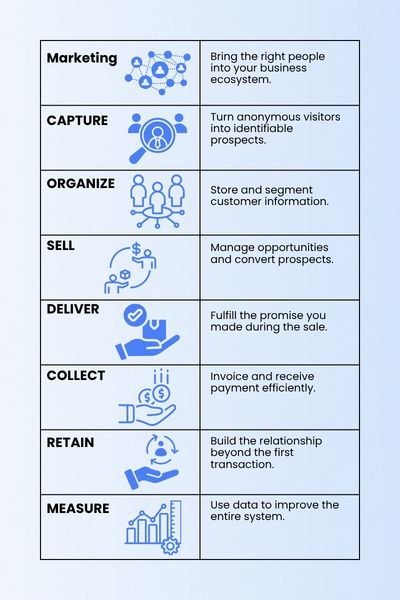
Every tool you purchase should ideally support one or more of these stages.
If a tool doesn’t clearly belong anywhere, ask whether you really need it.
Your Business Should Become Easier to Understand as It Grows
Growth often creates complexity.
More customers.
More employees.
More software.
More communications.
More transactions.
More information.
But a well-designed business system does something interesting.
It absorbs complexity.
Instead of ten people remembering ten different processes, the workflow remembers them.
Instead of customer information living in someone’s inbox, it lives in the CRM.
Instead of someone remembering to follow up, the system creates the task.
Instead of the owner asking everyone what is happening, the dashboard provides visibility.
That is the real purpose of building systems.
Not simply efficiency.
Clarity.
A business becomes easier to operate when information flows through predictable pathways.
And once those pathways exist, automation and AI become dramatically more powerful.
Because now they have a system to work with.
GMBS Action Challenge
Take 30–45 minutes this week and draw your current Business Operating System.
Start with these eight boxes:
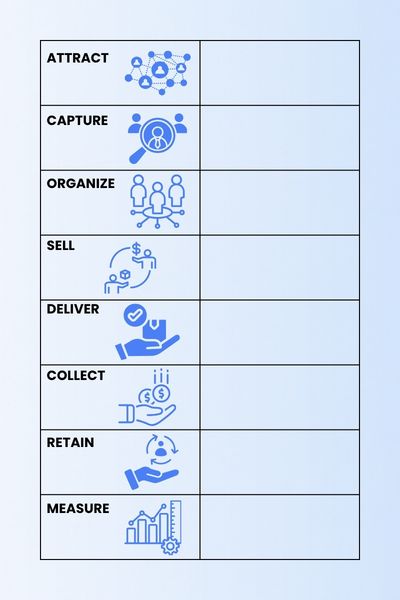
Under each box, write down the tools you currently use.
Then mark:
M — Manual process
A — Automated process
D — Duplicate data
? — Process you’re not sure about
Don’t try to fix anything yet.
First, make the invisible system visible.
Your biggest operational opportunities will often become obvious once you see the entire workflow on one page.